
Export & cutting: how to use it in CutStory
Save a video as ready-made stories.
Where to find it: Editor → Save
Step by step
1 Stories from any video cut automatically
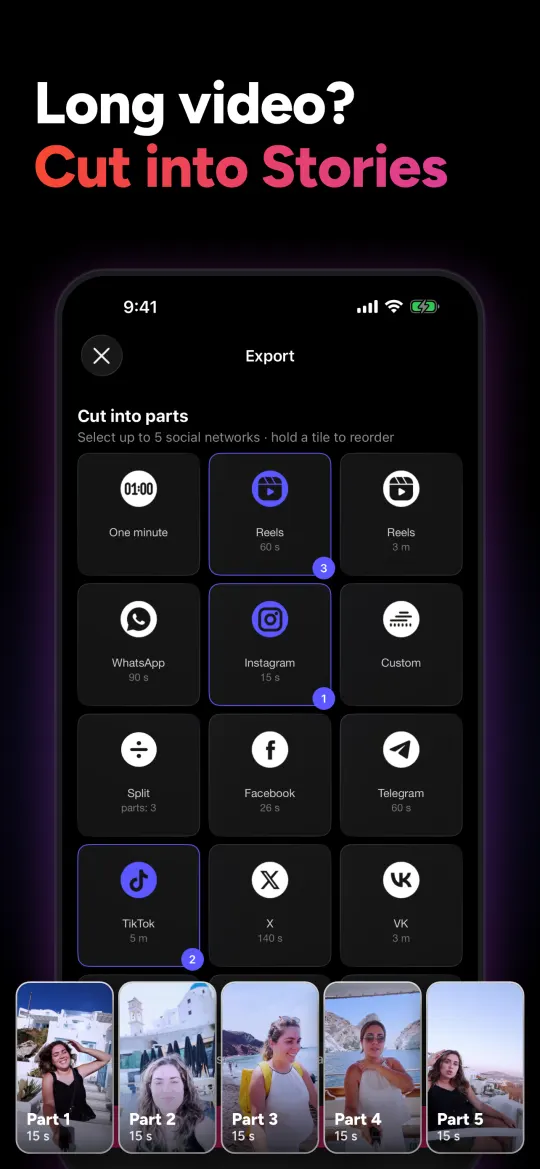
Edit your clip and tap Save: CutStory splits it into parts for the network you choose and saves them to the Camera Roll.
2 Pick a network we'll pick the length
Instagram, WhatsApp, Reels and other networks each have their own story limit — the app already knows it. Need another length? Set your own or save without cutting.
3 Parts in order and numbered
The parts land in the Camera Roll in order, with numbers. Pick several networks at once to get a set for each one.
4 Share right from the app
Every part has its own share button for the chosen network. Post them one by one without mixing anything up.
5 Your project stays waiting in Projects
Come back any time: finish the edit or re-cut the same video for another network.
Tips
- Need a length that is not in the list? Choose Custom length and set your own.
Related guides
Checked on CutStory 8.8.1, 2026-11-24. Still stuck? Write to us in Telegram or at support@highglossy.com.