
Quick Cut: how to use it in CutStory
Split a long video into clips in seconds.
Where to find it: Home → Quick Cut
Step by step
1 Long video into Stories in two taps
The app cuts your clip into equal parts by itself.
2 Pick a video from your gallery
Any length works — even a very long one.
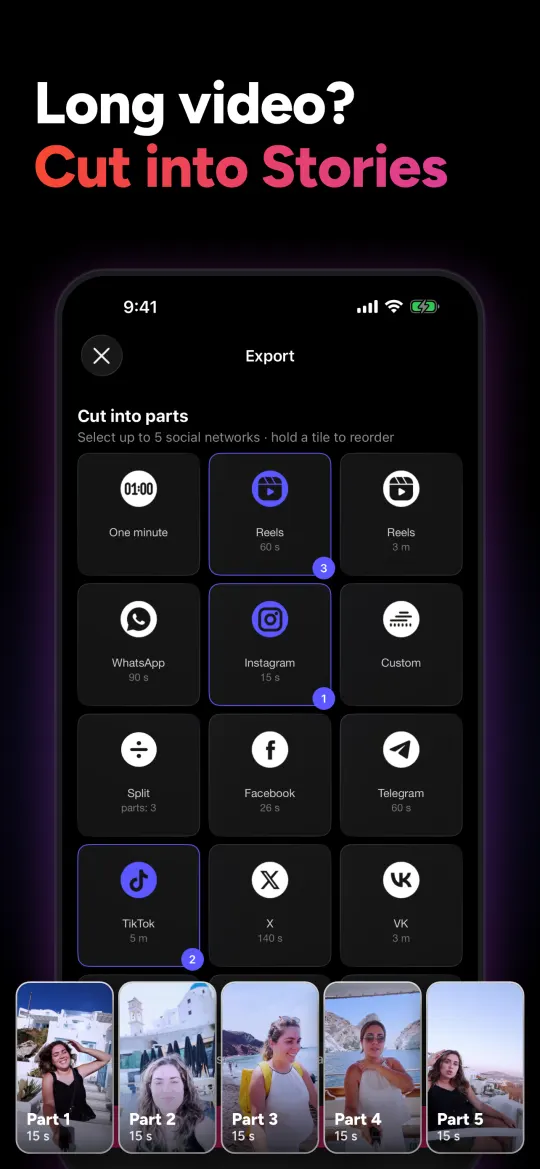
3 Set the duration 15 · 30 · 60 sec or custom
Presets for every social network — pick several at once.
4 Ready-made parts right in your gallery
Share the parts to Instagram or TikTok in order.
5 Even faster right from Photos
In Photos tap Share and choose Quick Cut in CutStory — no need to open the app.
Tips
- Choose several networks at once — you get a separate numbered set of parts for each.
- Turn on Equal parts if you want all parts the same length.
Related guides
Export & cuttingSave a video as ready-made storiesSubtitlesAuto-recognized captions for your videoText & stickersCaptions, stickers, GIFs and your logo
Checked on CutStory 8.8.1, 2026-11-24. Still stuck? Write to us in Telegram or at support@highglossy.com.