
Quick Cut from Photos: how to use it in CutStory
Share a video to CutStory without opening the app.
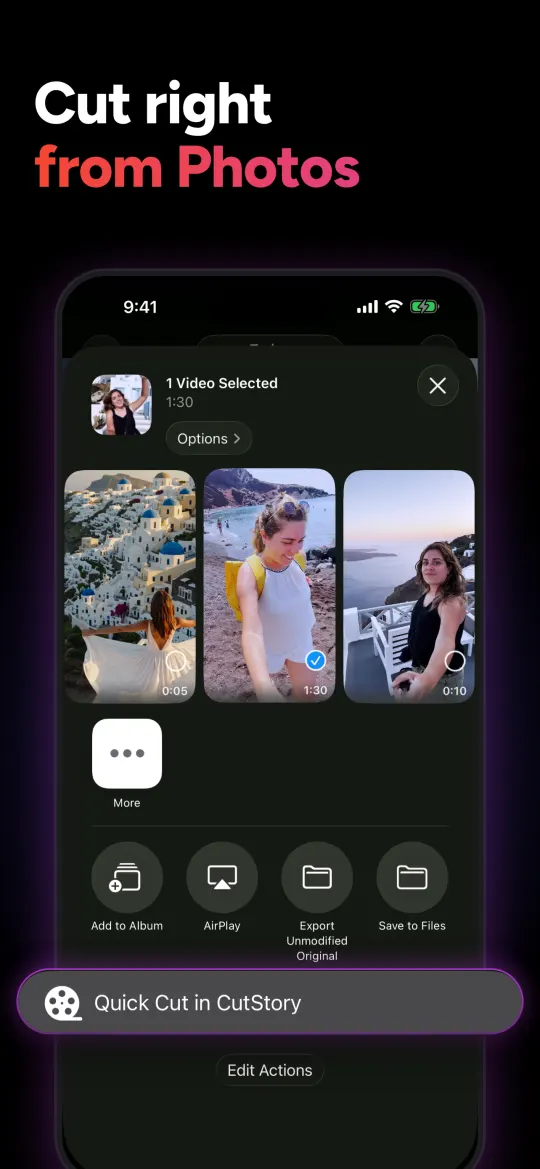
Where to find it: Photos → Share → Quick Cut in CutStory
Step by step
1 Cut from any app via Share
A video from Photos, Files or a messenger: tap Share, choose CutStory — and get the stories without opening the app.
2 Tap Share in Photos
Open the video in Photos, tap the Share button and find «Quick Cut in CutStory» in the row of apps.
3 Choose the network and the part length
Instagram, WhatsApp, Reels, TikTok or a custom length — the same list as in the app.
4 Parts in Camera Roll in seconds
The video is cut and saved to the Camera Roll in order — post the parts one after another.
5 Also on Home the Quick Cut tile
The same tool lives on the Home screen: the Quick Cut tile — pick a video from the gallery and choose the network.
Tips
- If you do not see CutStory in the row of apps, scroll to the end of the row, tap More and turn it on.
- Files, messengers and other apps with a Share button work the same way.
Related guides
Quick CutSplit a long video into clips in secondsExport & cuttingSave a video as ready-made storiesSubtitlesAuto-recognized captions for your video
Checked on CutStory 8.8.1, 2026-11-24. Still stuck? Write to us in Telegram or at support@highglossy.com.