
Cut several videos at once from Photos
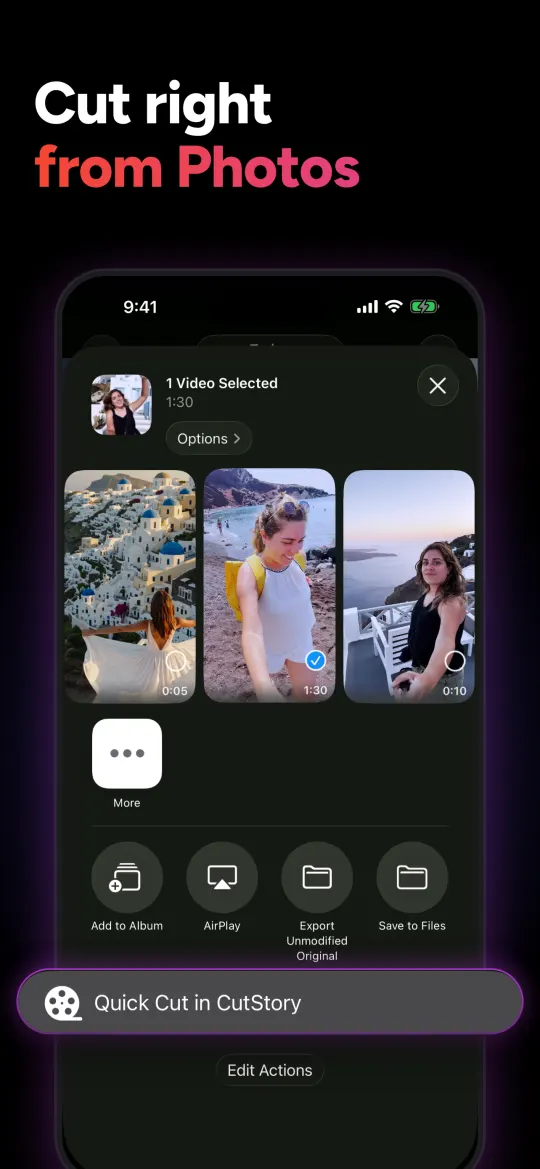
Quick Cut in the Share menu takes up to 10 videos in one go.
Where to find it: Photos → select videos → Share → «Quick Cut in CutStory»
Step by step
1 Select the videos
In Photos tap Select and mark up to 10 videos.
2 Tap Share → «Quick Cut in CutStory»
The CutStory cut screen opens right over Photos.
3 Choose the formats
Pick up to 5 networks or lengths — each video gets a set of parts for each.
4 Wait for the notification
When the parts are ready, CutStory lets you know. They are in the Camera Roll in order.
Tips
- On iOS 27 the parts are labelled in Photos, for example «Instagram 1/4», so they are easy to post in order.
Related guides
Quick Cut from PhotosShare a video to CutStory without opening the appQuick CutSplit a long video into clips in seconds
Checked on CutStory 8.8.1, 2026-11-24. Still stuck? Write to us in Telegram or at support@highglossy.com.